
I’ve blogged about scammers’ use and abuse of remote access software before. Specifically, I see Connectwise’s ScreenConnect software deployed by bad actors to infiltrate people’s computers. But this problem is expanding, happening more often this year. The uptick is rather alarming to me, so read on and buckle up:
Coming from Average Phishing Emails
I hash out a lot of the same blog posts about phishing emails. I know they’re retreads & rewrites of old threats, but it’s still useful to see examples of the latest nonsense to go around. But nowadays, I need you to be extra-wary. Sometimes, phishing mail can deliver covert installations of remote access software.
That PunchBowl invitation? It’s no longer just out to get your email password. It may try to install some scammer’s ScreenConnect. That greeting card message that just arrived? It might also try to run a Splashtop Installer or Teamviewer executable. That Docusign notice that looked vaguely relevant to your house sale? I’ve encountered a few fakes that didn’t lead people to their closing documents, but instead an app that would allow bad guys onto the PC…
It’s becoming frequent enough that I have to upgrade all of my previous warnings about phishing emails: You should not trust unexpected emails or other communications. If you cooperate with a fake email missive, you risk giving away your email password and possibly allowing complete access of your PC to a cybercriminal!
ScreenConnect is Not the Only Remote Access Tool
Professionally, I use ScreenConnect software to give aid to my customers. It is a legitimate program offered by the ConnectWise company. I pay a license fee to use it as one of the “good guys”, but the “bad guys” do not. They sign up for free SC trials, or they steal licenses from other tech people, and then use them for crime. Please understand that this type of software is just a tool. Like a weapon or a drug, it can be used for good or evil.
And there are many of these kinds of applications out there. ScreenConnect is a popular choice right now, but others are increasing in use for drive-by installations. As mentioned in a previous post, surreptitious remote access can be carried out through these other programs:
- Splashtop
- TeamViewer
- Ammyy
- LogMeIn Rescue
- RemotePC by iDrive
- AnyDesk
- ZohoAssist
- DWAgent
- Atera
- NinjaOne
- Faronics
- SimpleHelp
I list these out, in case you see them on your Installed Programs list. If you spot any of these on your computer, and you don’t know its origin, uninstall it ASAP! (The app can always be reinstalled later, if it came from a legitimate source.)
Remote Administration Tool / Remote Access Trojan
ScreenConnect and any tool like it may be referred to as a RAT — a Remote Administration Tool in the hands of a proper professional, and a Remote Access Trojan if used maliciously. Trojan is appropriate, because crooks slip these onto your system quietly and often unnoticed. But this “trojan” isn’t like a virus that will be caught as it enters your system. RATs squeak by most antivirus programs. Remember: guns and drugs and RATs are not inherently good or evil. It’s the intent behind them that matters. Your antivirus may not judge.
RATs sneak onto PCs via different methods. One way is convincing the victim to install it, using lies and trickery. For example, a person might click the link at the bottom of a Social Security phishing email. This leads to a site that claims the Adobe Reader is out-of-date. A flashing red button suggests that the update is ready, and a tap on that downloads a file called “AdbUdpate2026.exe”. If the user opens that file, it will install like any other program, but the end result may hide a RAT in the background!
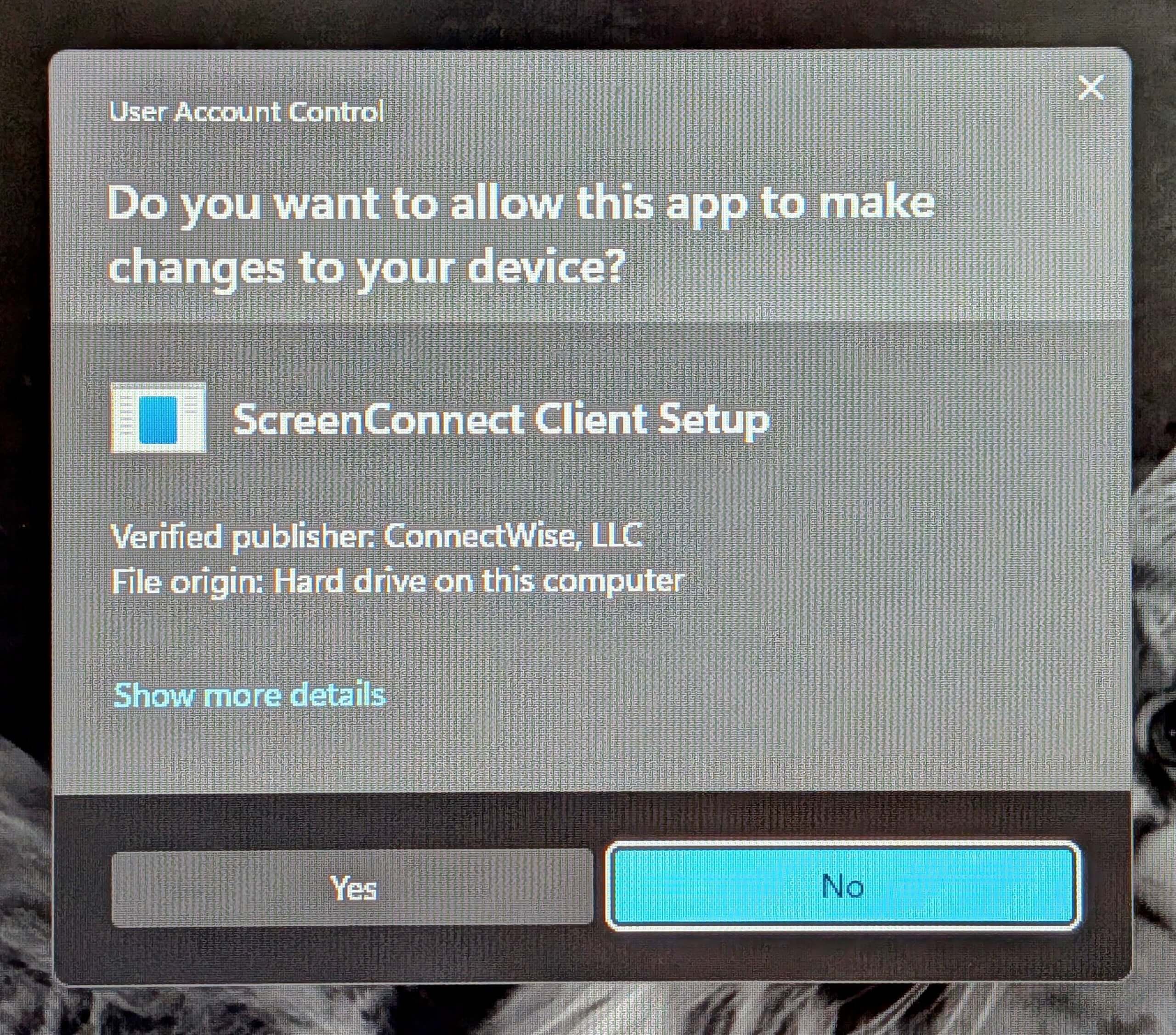
But even more sneaky is when a phishing message leads to a .VBS or .SCR file. These don’t install like apps. Some of these run code on computers, to install a program without any popups or permission-prompts. All it takes is a click or two on the downloaded file, and the effects are invisible.
And some threats still spread, using fake CAPTCHAs.
Symptoms of a RAT Infestation
Remote access-using criminals can be clever and patient. Sometimes, they wait a month before using their RAT to invade a victim’s computer. This makes it harder for the PC’s owner to figure out when and where the problem originated.
If some bad actor has access to your PC, here are some common symptoms:
- Unexpected mouse movement, windows opening to websites that you didn’t ask for, and ghost-typing
- A semi-convincing Windows Update message may appear over the whole screen, telling you not to turn off the machine. But this warning text will have a different color or font than Microsoft’s usual screen and no spinner or other motion (because it is a fake!)
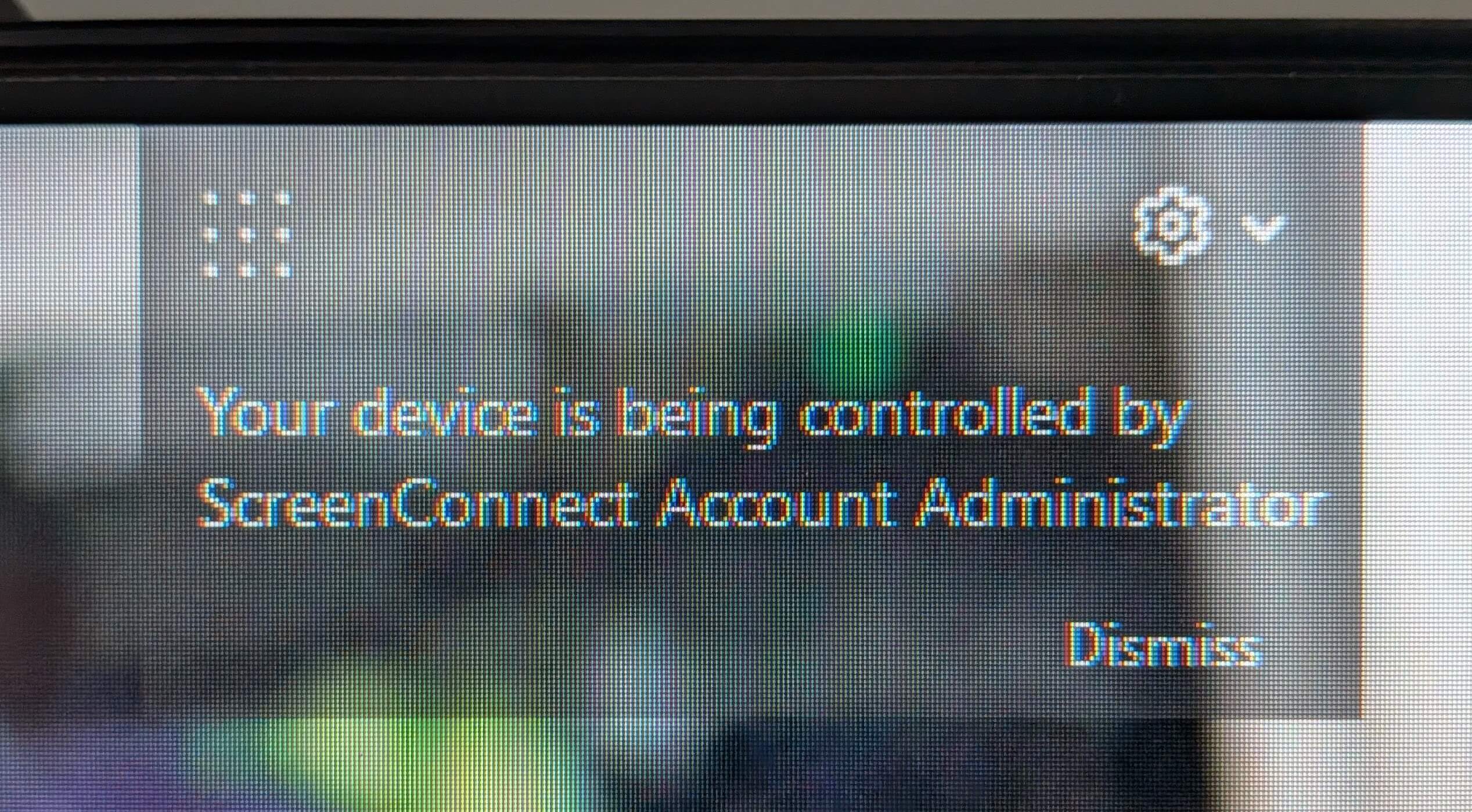
- Popup messages or banners that mention “access” or “control” of your system
- An unfamiliar password-screen that prevents you from using your computer
Best Practices & Silver Linings
The threat of malicious remote access is worth worrying about, but I hope I can temper your concerns:
- So far, this targets Windows computers only. These drive-by installations are not targeting Macs (Apple computers are very resistant to remote-access) or mobile devices
- Viewing a phishing email is safe. If you haven’t clicked any links or attachments, that means you haven’t triggered any installations
- If an email looks off, seems odd or triggers your Spidey-sense, you don’t have to think too hard about it. Step away from the computer and call the sender. You might be surprised how quickly a short convo can clear things up
If you have any reason to believe your computer is under the control of a stranger:
- Disable the computer’s internet connection OR just turn off the computer. If the computer is difficult to power down, press AND HOLD the main power button and it will shut off after 15 seconds or so
- Have your computer serviced by a professional. Make sure to mention that you want the system checked for remote access software
- Login to your purchasing accounts (Amazon, Walmart, Costco) from another device, spot-checking for any recent unfamiliar orders
- Start changing passwords to your email, financials and shopping accounts, if you find any surprise expenses or transfers
The Ultimate Protection Against a RAT
People ask me how to protect against this sort of menace, often. I typically say: Education, a healthy mistrust of the unexpected, and communication with other trusted people are going to keep you fairly safe. But even that isn’t a guarantee.
Since remote access apps get past antivirus apps, some companies are devising tools that address this threat. One program I can now mention, with some caveats, is Seraph Secure. This program is designed to detect, remove and block all known remote access tools. That includes ScreenConnect. And Quick Assist (which is built-in to all Windows computers). It’s fairly comprehensive: at the time of this writing, Seraph targets at least 247 known Remote Access Tools!
But my warnings are thus: Seraph Secure (and others like it) is an indiscriminate RAT-catcher. A ruthless exterminator, as it were. If you install it, it will squash the scammer’s RAT software, as well as mine or Geek Squad’s or any other similar program. And Seraph will continue to run in the background, auto-blocking other RATs from coming aboard. If you plan to seek in-person or in-store computer help, that won’t pose a problem. But if you ever again work with a legitimate remote support professional, make sure they know that you have Seraph on your PC. Otherwise, they will find it very difficult to do their job.