
Many people are finding my 2025 blog post, detailing how ScreenConnect is used in scams. I’m glad to hear how it helps people figure things out and free their computers of this particular problem. Since that writing, I’ve seen an increase in the abuse of this remote access program. I intend for this blog post to add to and update what I’ve written in that past post.
Why ScreenConnect?
There are many apps that allow remote access to computers (see list below). But ScreenConnect abuse is on the rise, and I can suggest these reasons:
- Legitimate licenses to ScreenConnect do come with a pricetag, but free trials are available. It looks like you can even sign up without supplying any payment info
- ScreenConnect can be modified to hide its taskbar icon, notification banner and uninstallation options. While I always use ScreenConnect overtly, scammers love how covertly this app can be configured
- It’s a versatile and full-featured program. It does a lot more than other remote access software, and some of its bells & whistles might be useful to the scammers
- ConnectWise products usually do not trigger warnings from security software. Your antivirus will typically allow ScreenConnect to install without any alerts
Vectors of Attack
As I encounter unwanted ScreenConnect installations, I can sometimes (but not always) determine where it came from. In 2026, these examples are how a lot of remote control abuse starts:
- The victim calls a shady phone number and is instructed by a scammer to install the ScreenConnect from a website or URL typed into the Run window
- An important-seeming email (pretending to be from Social Security or other government entity) has a zipped or HTML attachment (or fake JPEG) that guides the computer directly to a ScreenConnectClient.exe download
- Casual phishing emails with invitations or greeting cards lead to downloads, where a Screen Connect installer has been renamed to something less suspicious or more enticing
Extra Complications
Once a bad actor has control and access of a computer, I see where many of them install a second and even a third remote access program. There are many of them out there! I suspect they do this in anticipation of being found out. As owners and technicians begin to un-hijack computer, they may find one but not all of the programs that are allowing the bad guy into the PC. If you are scouring a computer for remote access programs, here is a list of what I see being (ab)used:
- Splashtop
- TeamViewer
- Ammyy
- LogMeIn Rescue
- RemotePC by iDrive
- AnyDesk
- ZohoAssist
At this time, I rarely see Chrome Remote Desktop or Quick Assist being used for scams. But if you are looking to remove every possible remote access tool from a computer, it is fine to uninstall these, as well.
Another complication arises when a malicious installation of ScreenConnect occurs next to a legitimate one. The computer can then be accessed by a legitimate technician (like yours truly) and also by a cybercriminal. If this happens, you might see two line items for ScreenConnect on your programs list. But there is a way to tell them apart. Each ScreenConnect has an identifier code, and mine ends in “cf5“. If you’re looking to uninstall the bad guy’s software and not mine, that instance ID is the only way to tell them apart. If you uninstall my software, though, it’s not a problem and my feelings won’t be hurt!
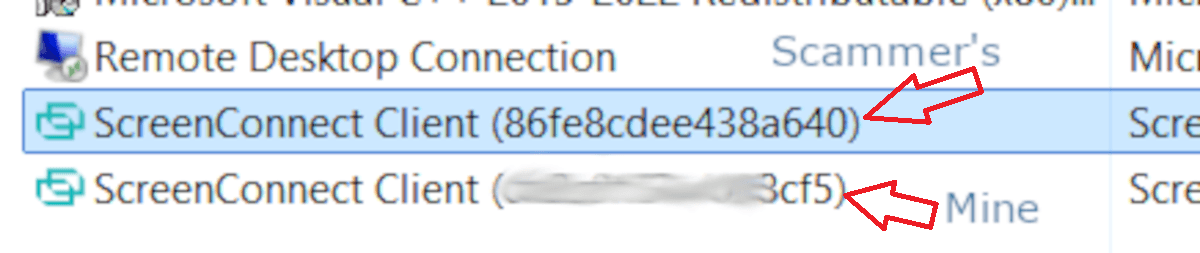
But this gets worse if the criminal knows a trick on removing app names from the Installed Programs lists. Using registry tweaks or freeware tools, a bad guy can install ScreenConnect (or any other program listed above) and then vanish it from the Control Panel and Settings area. You won’t be able to uninstall it by normal means, and you may not even know it’s running on the machine. To find such a hidden app, you’ll have to be comfortable rummaging around in:
- the Windows Registry
- Task Manager / Startup Apps
- Task Scheduler
- MSConfig (System Configuration)
- the Services Console
Perhaps the most unexpected and maddening twist with all of this is that there can be a big delay between the installation and the abuse. I have helped various people recover computers from remote control abuse and account takeovers, where we can see that the Connectwise was installed 2 to 4 weeks prior to any foreign activity! The remote access app just sat on the machine, like a sleeper agent. The victim moved on from and forgot about whatever shady email or link they had interacted with.
For Technicians and Advanced Users
In case any fellow technicians or power users are reading, I’ll share some under-the-hood details about the ScreenConnect software. This may be useful for your troubleshooting or reporting abuse incidents to ConnectWise. For everyone else, don’t worry too much about this section.
As shown above, each ScreenConnect installation has a special identifier. But if you don’t see that code on the Installed Programs list, it is hiding in other places. You are going to need that ID for any report you send in to ConnectWise.
If you are comfy rummaging around in the Windows Registry, check out HKEY_LOCAL_MACHINE\SYSTEM\CurrentControlSet\Services\ScreenConnect Client (Instance ID). You can copy that info, screencap it, or even export it as a .reg file.
You might also spot this identifier in C:\Program Files (x86), on the ScreenConnect folder. If not, check C:\Program Files and C:\ProgramData
If ScreenConnect is refusing to uninstall, or the files/folders are difficult to delete, you might try to hamstring the running processes first. Task Manager is the first place to go, to find and “End Task” on anything with ScreenConnect in the name. If that doesn’t help, visit the Services Control Panel: Open a run prompt and type in services.msc and click OK. Right-click any ScreenConnect item on this list, and then click Stop. Then your removal efforts should be more successful.
Revo Uninstaller may also help with ripping out a stubborn ConnectWise app.
For more forensic details, you can open Event Viewer to see when ScreenConnect has been used on a target PC. In a run prompt, type eventvwr.msc and click OK. Create a Custom View to show only ScreenConnect events. Each line item will have an Event ID, and ConnectWise shared this guide with me:
- Event ID 1 – The client encountered an error
- Event ID 20 – The client connected to or disconnected from the ScreenConnect server
- Event ID 40 – An error occurred during a file transfer
- Event ID 100 – A Host user connected to the device
- Event ID 101 – A Host user disconnected from the device
- Event ID 200 – A command was executed remotely on the device
- Event ID 201 – Files were transferred
This has helped me confirm not only when the software was used, but when it was first installed (not always known to the victim).
While I support plenty of Mac users, I have yet to meet with a ScreenConnect abuse on an Apple or Linux machine. Still, it could happen, and ConnectWise offers removal info for such scenarios at this page.
Final Comments
ConnectWise offers a Tech Support Scam Checklist that may be of use, to scam victims as well as support personnel.
If you receive any communication you are unsure of, I always welcome you to forward it to me or talk to me about it. I’ll be happy to give an opinion of whether it’s legit or a hazard.