

In the past, I’ve recommended using the Bitdefender Trafficlight extension. That freebie would help as you search the web and visit new websites, warning of dangers and risks along the way. Recently, Bitdefender overhauled that tool, and it is now called Bitdefender Web Sage. If you were already using Trafficlight, it has probably transformed into Web Sage in your browser.
I continue to recommend this product for enhanced security as you surf. But since this is a new product, I’ll go over some details and advice.
The Basics
The Web Sage extension is available for Chrome, and Edge, and most other Chromium-based browsers. But not yet for Firefox or Safari. As of this writing, those two browsers still have to use the older Trafficlight extension, but Web Sage is coming for them in the future.
When you install or turn on your Web Sage extension, please know that it now requires you to “sign-in” for it to work. This involves you submitting your email address, creating a Bidefender account and choosing a password. If you don’t care to do this, you can opt not to and remove the extension from your computer.
If you do sign-in to Web Sage, it should begin automatically protecting your browser. It will give you a choice at some point: Guided Protection (Standard) vs. Automatic Protection (Premium). Premium is a paid service. At this time, I recommend you choose the Guided Protection, which is free.
More Details
Web Sage may offer to scan your web history. You may accept this scan or skip it. It’s just looking to check for anything suspicious already in your browser or saved websites.
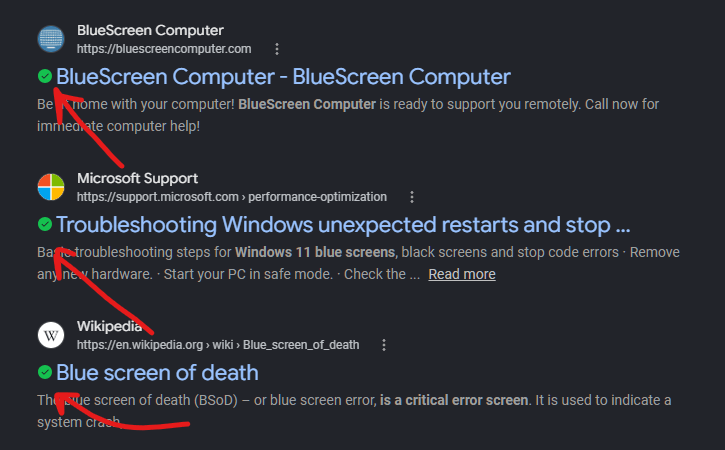
Once the scan is done, you may close any Web Sage panel and use your browser as normal. When you use a search engine, you may notice that Web Sage puts green markers next to each result. These are intended as an early assurance/warning system. A red marker would be your clue to not click that particular link!
Aside from that, Web Sage should be a silent protector, and not bother you too much. It should lie low and only pop-up to protect you from a phishing website or other detected scam.