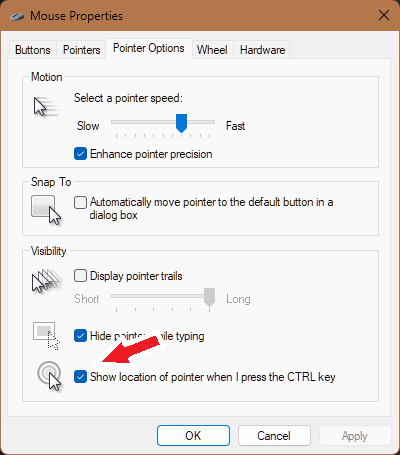
Sometimes, you just don’t know where your mouse cursor has gotten to! It could be a combination of things: You have 3 monitors, or your monitor is very large and your cursor is small, or you just have a whole lot going on and things are busy and cluttered on-screen. If this sounds familiar, I have a tip to help you find your lost mouse cursor.
There’s an old tool hiding in Windows you might turn on. If you do, you may then press Control on your keyboard at any time and it will trigger a visual effect to call out your cursor to you.
But because this is a classic function, it’s hard to find:
- Click Start, go to Settings.
- Click Bluetooth & Devices
- Click Mouse
- Click Additional Mouse Settings
- Click Pointer Options
- Check the box at the bottom for “Show Location of pointer…”
- Click OK