
Costco is such a big name in the USA, that their name is used in a lot of online scams. But this latest one is amazingly believable. You should see this fine example of Costco phishing, so that you don’t fall for it when it arrives in your inbox:
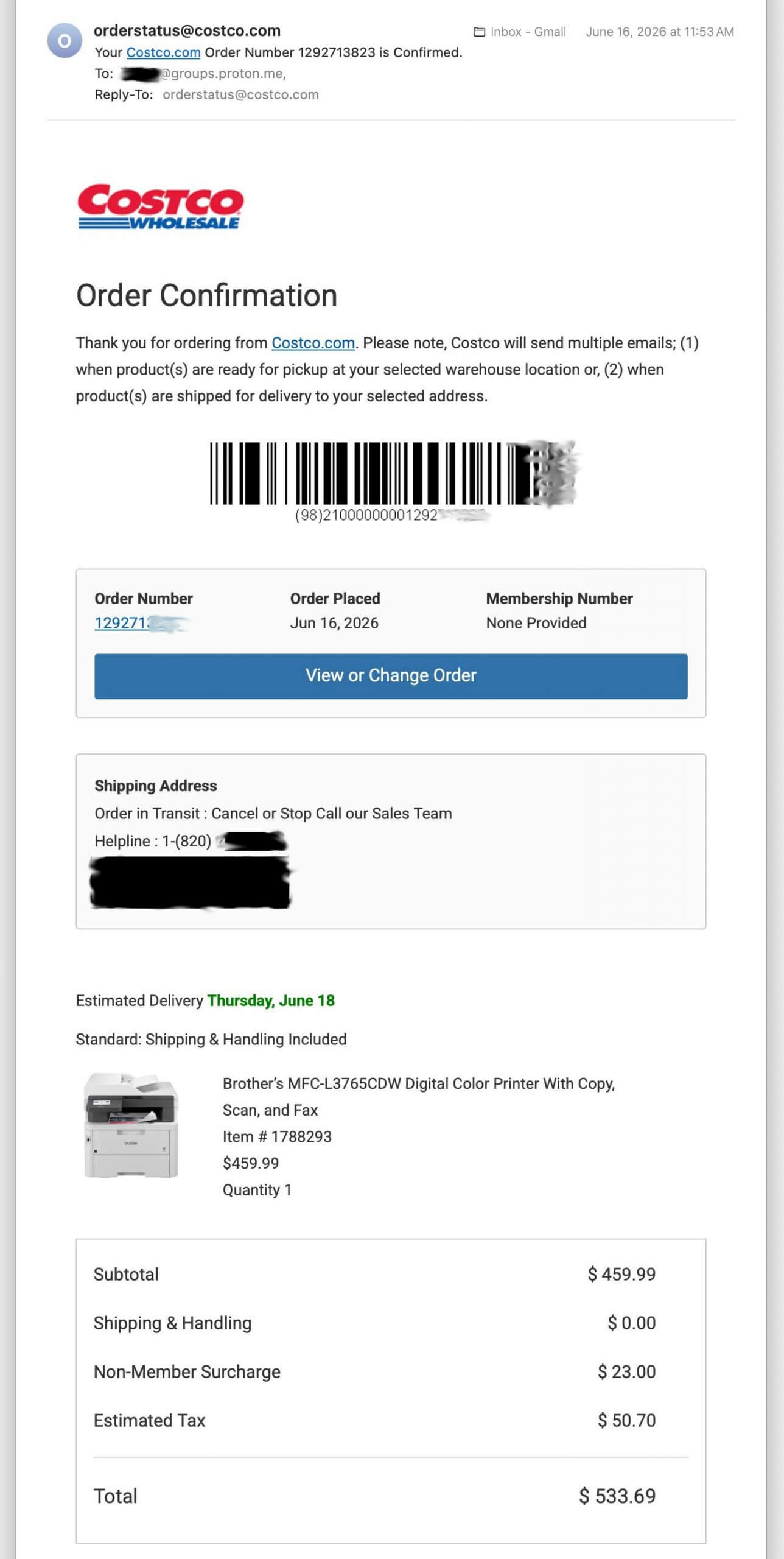
The above graphic shows an email from Costco, for an online order of an expensive printer. Yes, this email truly came from Costco. Yes, someone placed an order for a high-dollar item. But no, you will not be charged for anything, and you must not respond to this type of message.
The scam here is like many other online messages: the bad guys want to upset you with the surprise bill and tempt you into calling the phone number shown in the midst of the email. But that “helpline” is a fake and will not connect you to Costco! It goes straight to the scammers, who are ready to lead callers into the same old remote-control fraud they’ve done for years. If you receive a Costco email like shown above, you must not call the phone number inside of the email!
The Genius Exploits of This Scam
This scam is going to be more successful than others because of its sophistication. As mentioned, this scam is delivered through legitimate Costco order emails. Anyone can create a Costco website account (without a Costco membership), get signed in and immediately start ordering things. Even cybercriminals.
Since the phishing email is from Costco, the grammar and spelling are perfect. The graphics and links raise no suspicions. This message will not end up in any spam folder. And if you click the View or Change Order button, it will take you to the real Costco.com website… but never fully load the order.
The bad guy who placed this order figured out that s/he can type anything they want into the Shipping Address fields. So they put in that text about a Helpline and a phone number. Costco will surely need to fix their website, so that this abuse is stopped. But it often takes a long time to redesign a huge corporate site like this.
The crook also put a ProtonMail “groups” email address on the order. That’s another new-ish trick that allows for mass-emailing. Inside of the scammer’s ProtonMail group is probably a long list of email addresses. When an email is sent to that group address, it is relayed to all of the other addresses inside. That could be up to a 100 different people that receive this phishing message, with each Costco order that is placed.
If You Receive This Scam
- Don’t call the number inside of the email. You may contact Costco at their official contact phone numbers or through their website, if you need extra assurance or want to report the email & order number to them.
- You may also print out the suspicious email and present it at any Costco store’s service desk.
- You may consider reporting the particular ProtonMail address shown in the email, using this Proton Abuse website.
- Don’t report the email as spam. Don’t “block” it. Just delete it. This will ensure that you continue to receive normal emails from Costco.