
So I have this older lapttop with an odd problem. As I type on it, the keysttrokes repeat for some letters. This is a sligghtly maddening glitch, especially for someone who typees a lot and wants ttheir writing to look professional. Sure, spellchheck catches most off these typos, but it really slows down the writing and thoughtt processes.
Troubleshooting
As this problem developed, I went through the basic troubleshooting steps. Ran all the possible updates from papa Microsoft. Went to the manufacturer’s website for updated drivers and other downloads specific to my machine. Uninstalled and reinstalled the keyboard drivers in various ways. Dusted and cleaned the laptop with compressed air. All to no avail.
It became clear that the keyboard was physically at fault. The typing repetition did not happen when I connected an external keyboard and typed on it. But if I took the computer out of Windows, and booted from a different OS (Linux on flash drive), the built-in keyboard was still wonky. All of this took the blame away from Microsoft and other software and placed it on the keyboard itself. I eventually discovered that this is a known defect that occurs in keyboards, due to worn-out key switches, called Keyboard Chattering.
Replacing the Keyboard?
Laptop keyboards can be replaced, but I was reluctant. Sure, I’ve swapped out plenty of these components in the past 20 years, and my particular keyboard panel would be less than $100 to obtain, but:
The laptop is 4 1/2 yrs old, which makes it hard to justify any major expense. I am forever telling people, “Don’t sink money into that 5-yr-old machine, you’ll live to regret it, put that money towards the next computer!”
I could see I’d have to completely disassemble the computer to get at the keyboard panel. Reassembly would be complex and involve applying new thermal paste on the cooling elements. And there’s another risk lurking here, akin to when a doctor considers surgery on an octogenarian patient. Even if things go perfectly, the advanced age of the computer could lead to unexpected problems during or after the “operation”.
And, the keyboard wasn’t truly broken. It was just misfiring. It still worked, so maybe there was yet a tweak or app that would help me cope.
A Clever Software Fix
Windows 11 still has some basic keyboard settings that were relevant to this issue. I pressed WIN+R, typed in “control keyboard” and started experimenting with the Repeat Delay and Repeat Rate sliders. But this only led to disappointment. No effect on the double-typing.
This is about where I learned the naming of “keyboard chattering” and that lead me to software fixes and geniuses who knew how to write programs to address this rare issue. The first app I tried did not help, but the second one did. As soon as I installed Keyboard Unchatter, I could see my typing no longer showed duplication.
Not only that, this clever little app could track and show me the keys that had the highest failure rate. OK, maybe not that important, but I find it fascinating…
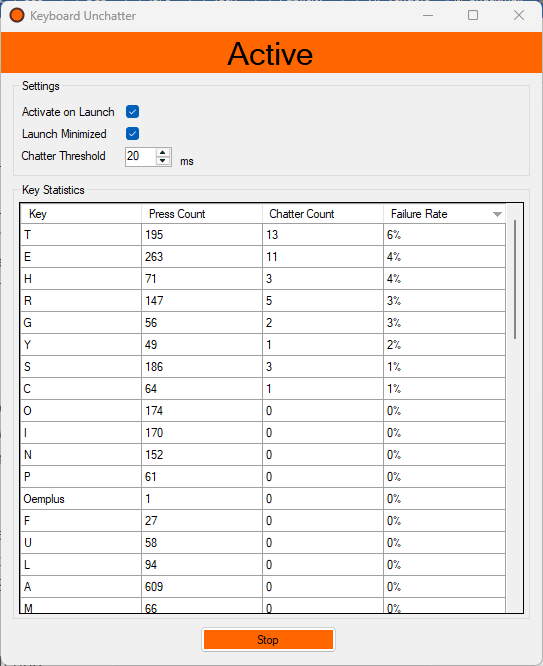
T H E … haha!
Right, but notice it isn’t S T E R N L … Because not all of the keys are failing, just certain ones.
The keys on a keyboard are grouped in branches along the hidden circuitry. You can somewhat see the grouping on this keyboard membrane: https://www.cpcwiki.eu/imgs/d/df/Keyboard_membrane2.jpg
So my laptop probably groups the T H E R G Y keys along one path, and that’s the path that’s shorting out or corrupting. My failure rate graphic above is equivalent to a Venn diagram showing the letters on that one branch vs the most common letters in the English alphabet.