
Gemini is the Google flavor of AI and they are inserting it and related Smart Features into almost every Gproduct you use. If you are not a fan, I get it. And I hope this helps: here are a bunch of settings you can search out, to disable Gemini and other too-helpful features in your everyday Google apps:
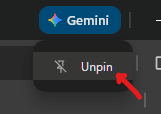
At the top of your Chrome Browser
This one’s easy. If you’ve noticed Gemini lurking to the upper-right of your computer’s browser, just right-click on it, and then select “Unpin”.
Within Gmail
Using a computer:
- Go to Gmail in a web browser and make sure you are signed in to your Google account.
- To the upper-right, click the cogwheel and then click See All Settings.
- In the General section, find the section “Smart Features” and consider turning off the single checkbox offered.
- Next, scroll down to find “Google Workspace smart features” and click the button for Manage Workspace smart feature settings.
- Look over the details of the two toggle on this page, and feel free to turn either or both off and then click Save.
On a mobile device, you should be able to adjust these same settings. Open your Gmail app, tap the hamburger button to the upper-left, and scroll down to find Settings. Tap on your Google/Gmail account, and your options should correspond to Steps 3 & 4 from above.
In Google Drive
On a computer:
- Go to the Google Drive website in your browser and make sure you are signed in to your Google account.
- To the upper-right, click the cogwheel and then click Settings.
- On the left, click Manage Apps.
- Find Gemini in the list and uncheck the box for “Use by default”.
I do not see how to do this on a mobile device (yet).
Digital Assistant (for voice-activated devices)
If you talk to devices in your home with a “Hey, Google!” wake word, you have a choice. Your listening devices can use Gemini or the classic Google Assistant to help you. But that option is pretty hard to find:
- On your mobile device, open the Google App (that’s the one with the multi-colored capital G for its logo).
- Tap your account bubble to the upper-right and then tap Settings.
- Tap Google Assistant.
- Scroll down and tap on Digital assistants from Google.
- Select the bubble you prefer, next to Gemini or Google Assistant.
Android Devices
You may uninstall the Gemini app if it is present on your Android phone or tablet. Tap Settings, go to Apps, See All Apps, and find Gemini in the list. Tap it and use the Uninstall button.
If you see any unintended consequences from turning off these options, Don’t Panic. Simply understand that a lot of Google bells and whistles are linked and dependent on each other. Disabling one feature may prevent you from using others. The good news is that you may freely reverse any of these changes, to restore any lost functionality. Even the Google Gemini app is a quick (re-)download from the Google Play Store.