
I receive more and more calls about Android tablets, where the user is inundated with popups, and the home screen has been made-over with new colors schemes and icons. It’s very alien and uncomfortable when this happens, and it often tracks back to some app that has changed the Default Home App. So let me describe to you where to find this setting, in case you have to deal with this nonsense:
On your Android device, tap Settings (the grey cogwheel) and go to Apps.
Tap on Default Apps, then tap Home App.
On this next screen, you may have the choice of different apps, and you should set it to the original Home app, the one that came with your device from the start. But which one is it?
The normal Home app varies from one Android to the next. It might be called Quickstep or One UI Home or Pixel Launcher. If you are unsure, you are welcome to change to any listed app, and recheck your device.
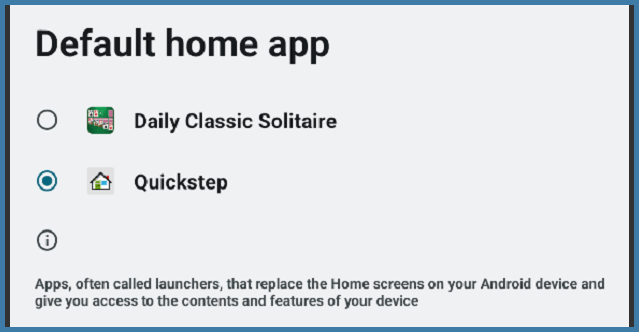
One thing is for certain: you don’t want your Default Home App set to any game- or weather-related app. Those typically cause pop-ups galore and other types of interference!
After you switch away from any aggravating Home apps, you are welcome to hunt them down and uninstall them. Go to Settings -> Apps -> See All Apps for an alphabetical list, touch on any app that annoys you and look for an Uninstall button.